Creating a recurring calendar event for the last weekday of the month
Published on in Streatham Hill, London, UK.
(skip intro; aka: don’t bore us, get to the chorus)
As I write this, I have been a contractor for nine and a half years (!), and calendar apps for scheduling and keeping track of recurring tasks that are inherent to this have helped keep me (relatively) sane.
One of these is invoicing. In my entire career of freelancing, every single client, bar one, has requested invoices to be sent to them on either the last day of the month, or the last working day of the month. I tend to prefer the latter if I can, just to get things kicked off a little earlier if there’s a long internal process for getting your hard-earned payday.
But somehow, calendars I’ve used don’t seem to have support for creating a recurring event for the last working day of the month. Last day of the month? Easy. Last Friday of the month? Easy. Last non-weekend day of the month? Absolutely not. Stop it right there, bucko.
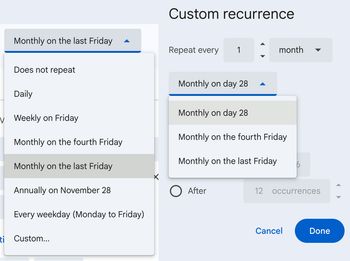
I thought when I switched away from Google Calendar to the bougier, fancier, fully-featured Cron calendar for people who are Serious about Calendars (inevitably acquihired by Notion, rebranded, and left to linger unless you’re a Notion power user), it might support this.
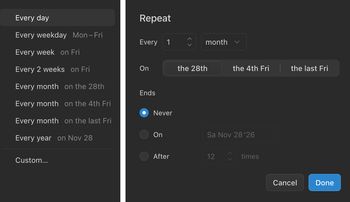
Also no. You might at this point be fooled, gently give up, be content and accept that this just Isn’t Something You Can Do.
Wrong, as it turns out, once I actually tried looking into what exactly comprises a calendar event. The Internet Calendaring and Scheduling Core Object Specification is an RFC standard written by calendar enthusiasts. You could probably schedule an event that repeats between now and the inevitable heat death of the universe on every fourth Saturday of months named after Greek gods (but not Roman), except if the month only has four Tuesdays or ends in a day beginning with a letter that’s not T in Old Norse.
But we’re not here to do that. We’re here to make an event that ends on the last weekday of the month. And it’s not too hard to wrap your head around, either.
The actual iCal file
The below is a fully-formed .ical file that you can import into any calendar software that supports it. Here’s where you presently do that in Google Calendar. It has some weird gubbins that I’ll explain afterwards, but all of these are required fields in the standard, so it’s best to keep them in.
BEGIN:VCALENDAR
VERSION:2.0
PRODID:-//Alex Jegtnes//iCal examples//EN
BEGIN:VEVENT
SUMMARY:Invoice client(s)
UID:last-weekday-of-month-blog-example@jegtnes.com
RRULE:FREQ=MONTHLY;BYDAY=MO,TU,WE,TH,FR;BYSETPOS=-1
DTSTART:20251128T100000Z
DTEND:20251128T110000Z
DTSTAMP:20251121T104800Z
END:VEVENT
END:VCALENDAR
To explain some less obvious oddities
- each iCal file must have one VCALENDAR, with a version number
- the
PRODIDaccording to spec needs to be unique to the vendor, and I guess I am technically a calendar vendor now. Good lord. Okay. Cool. If you’re a veteran web developer and think there’s something familiar about this syntax, you’re right, this is in the format of a Formal Public Identifier and it’s what we all copy-pasted in our<!DOCTYPE>s to identify our targeted (X)HTML versions before HTML5 went away with it, nearly 18 years ago; if you did, in fact, remember this, straighten your back and make sure you’re making your regular pension contributions. - each iCal file must have one or more
VEVENTS SUMMARYis the event title, as we commonly know it, not the description (which I’ve left blank)- the UID is supposed to be entirely unique for each (recurring) VEVENT, so there’s possibly (?) a chance of Things Going Wrong if you share your calendar with somebody who has also downloaded this exact last-weekday-recurring example.
- the
RRULEis the meat and potatoes of the repeating logic, and it’s pretty comprehensible. "repeat frequency is monthly, on days that are Monday, Tuesdays, Wednesdays, Thursdays, and Fridays, but-1restricts it to only the last valid selected interval. DTSTARTandDTENDare the start and end dates in UTC,DTSTAMPis less obvious and basically is just “when this event was created at”. If you’re not roughly UTC-adjacent, Google Calendar presently allows you to edit the time while leaving the poor little unsupported recurrence alone.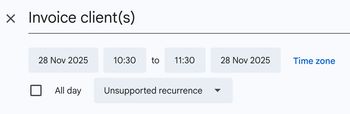
- this doesn’t specify when you’ll be notified, and leaves that up to your default calendar’s preferences. Just like the above, this can be changed once you’ve imported it.
- even though it says “unsupported recurrence”, Google Calendar understands the recurrence just fine, it just won’t let you edit it.
As a fun piece of trivia to finish this post off: I realised, basically exactly as soon as I had finished writing this post’s first draft — the exact use case this entire post is about is a literal example in the iCal RFC documentation for the RRULE.
And yet. Come on Google. If you stop throwing ten billion quid a second after generative AI models for two seconds you have it in you. I believe.